
Get More from GARY: Prompt Engineering Guide
Duration: 6:02
Gary is CORAS's embedded AI orchestrator - not a generic chatbot, but a mission-trained digital workforce that understands Department of Defense context, from TRLs to funding lines, with no additional training required. Gary orchestrates over 130 specialized AI agents using more than 1,300 validated prompts to execute real work: analyzing data, generating acquisition documents, creating visualizations, running what-if scenarios, and driving workflows. This guide covers the fundamentals of working with Gary and crafting effective prompts to get the most out of CORAS's AI capabilities.
What Is GARY?
Gary is an AI decision agent embedded directly within the CORAS platform. Unlike generic AI assistants, Gary is integrated into the CORAS codebase, meaning every insight happens directly inside your mission workflows. He is backed by CORAS-native tools and AI agents, and he respects role-based access governance models and mission-specific structures.
Why Use GARY
Works inside your existing data and workflows.
Grounded in structured, CORAS-native information rather than general training data.
Respects your governance and access controls.
Saves time by summarizing, prioritizing, and recommending actions in real time.
Gary vs. Generic LLMs
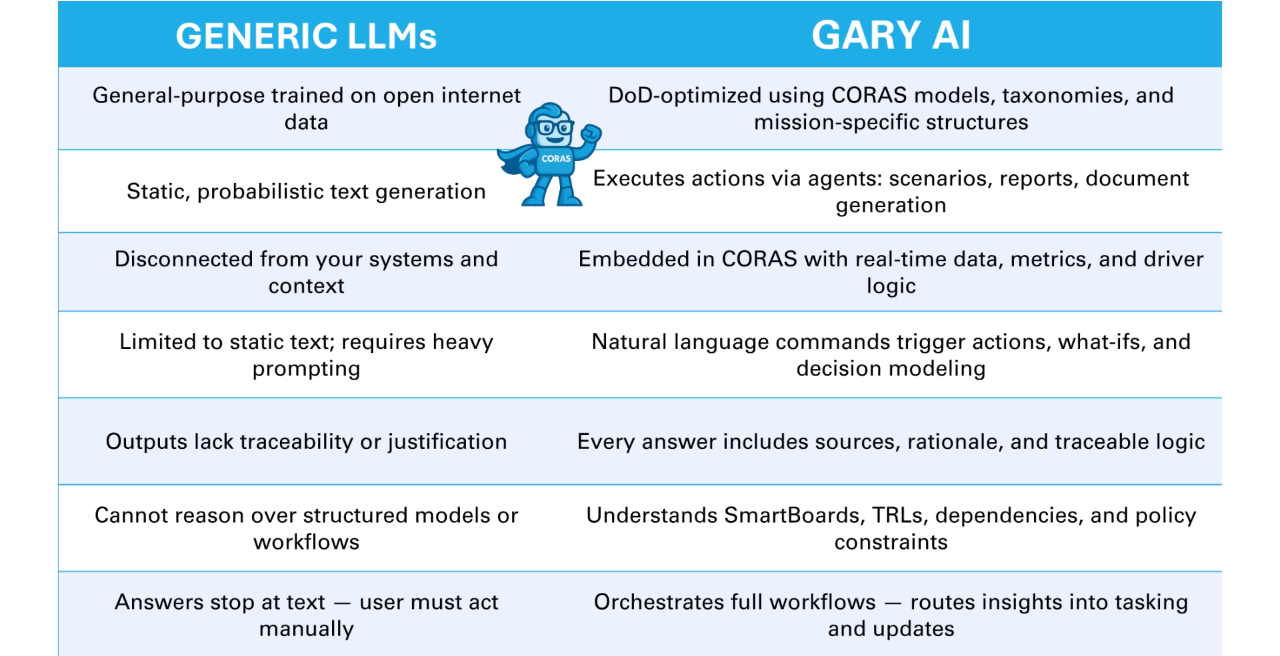
Most generic LLMs are trained on open internet data and generate text disconnected from your systems, context, and command structure. Gary is DOD-optimized and uses CORAS models, mission taxonomies, and live operational data to reason over your metrics. Natural language commands trigger actions, scenario modeling, and document creation. Every answer includes the rationale and traceability needed for mission decisions.
Key Capabilities
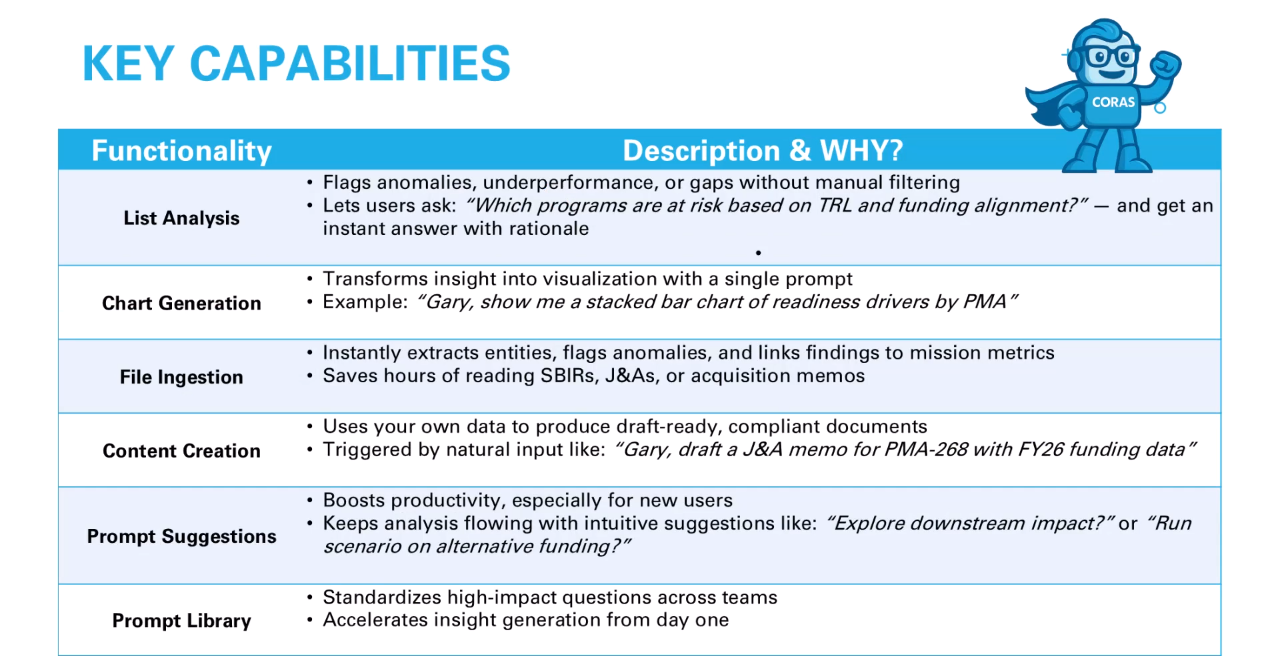
List Analysis
Gary can flag anomalies or underperformance based on TLS, funding alignment, and more, all without manual filtering.
Chart Generation
Request a visualization and Gary generates charts such as stacked bar charts by PMA.
File Ingestion
Upload documents such as SRSs or JNAs, and Gary extracts key coIf Gary's answer isn't what you expected, check: (1) which agent is active, (2) what list you're scoped to, (3) how specific your prompt was.dintent and flags relevant items.
Content Creation
Gary uses your data to draft ready documents such as acquisition memos or readiness reports.
Prompt Suggestions and Library Access
Gary helps you ask better questions and provides prebuilt templates to accelerate performance.
Prompt Stages
Prompts can follow five progressive stages:
Exploratory — Discover what data and insights are available.
Analytical — Dive into trends and drivers.
Decision-Oriented — Build what-if models.
Selection-Based — Narrow down options.
Execution — Trigger an action such as generating a slide or updating a smart board.
The Prompts Library
Gary includes a built-in prompts library with curated natural language prompts aligned to real-world tasks and CORAS workflows. It supports roles such as program managers, analysts, PEOs, and leadership. The prompt library is fully customizable and can be aligned to your organization's terms, data models, and workflows.
Crafting Effective Prompts
Be specific — Include program names, timeframes, metrics, or data fields. "Summarize program health" produces a general answer. "Summarize TRL status and funding alignment for all programs in the ISR portfolio as of Q2" produces a usable one.
Use mission language — Gary understands DoW terms like TLS, ISR, and POM. Use the language your team uses. Gary is built for it.
Start broad, then refine — Begin with a general question and follow up naturally to narrow the insight.
Focus on the outcome — Before you type, ask yourself: what decision does this output need to support? A prompt aimed at a decision produces a better result than a prompt aimed at a topic.
Chain prompts — Start with an analysis, move into scenario modeling, then generate a summary or slide in one conversation flow.
Prompt Examples
"Flag any programs missing TRL scores in this list."
"Compare actual spend versus baseline cost for all active contracts."
"Summarize decision impacts if Program X is delayed by 90 days."
"Generate an acquisition memo based on this analysis."
"Which programs should leadership prioritize for the next POM cycle?"
The Prompt Library
Gary's built-in Prompt Library contains curated prompts aligned to real-world tasks and CORAS workflows. Use library prompts as-is for consistent, validated outputs — or use them as a starting point and modify them for your specific task.
To access the Prompt Library, open a Gary conversation and select the Prompt Library option. For information on adding prompts to the library as an admin, see Gary AI — Agents and Prompts.
Keep Going
Agents and Prompts — understand how agents shape Gary's outputs
Gallery of Agents — find the right agent for your task
Save Responses with Memos — save prompts that produce great outputs
Get Help
Contact your Customer Success Manager or visit the Customer Resource Center for additional support with Gary and prompt configuration.