
Share a Conversation
Why It Matters
When you share a conversation, the recipient gets the full context — every question, every answer, every source GARY drew from. That's a complete handoff, not a summary.
Share a Conversation
1. Open the GARY conversation you want to share.
2. Click the conversation settings button to open the data context panel.
3. In the Share conversation section, turn the Share conversation toggle on.
4. The link field becomes active. Click Copy to copy the shareable link.
5. Send the link however you like — Slack, email, or wherever.
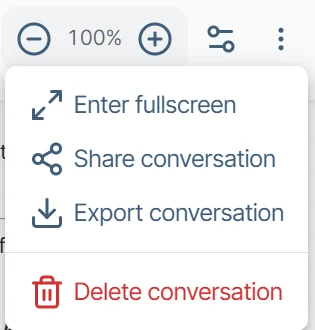
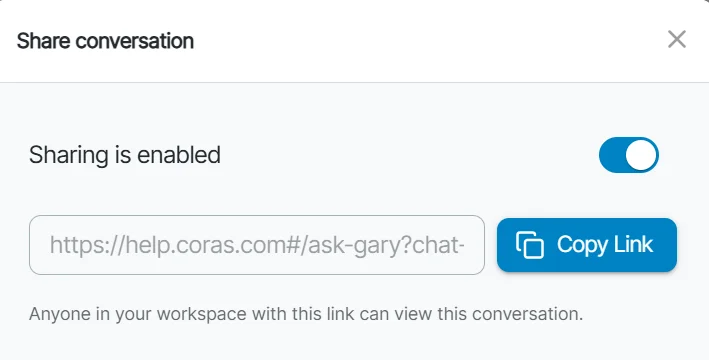
To stop sharing, turn the toggle off. The link stops working for everyone immediately.
Export GARY Conversations
Every GARY conversation can be exported to review it outside the platform, share it with stakeholders, or keep it as a record.
Export as PDF
Exports a clean, formatted version of the conversation — your prompts and GARY's responses — as a PDF. Useful for briefings, reviews, or documentation.
Open the GARY conversation you want to export.
Click the export icon or select Export from the conversation options.
Select PDF.
Download or save the file.
The PDF export is formatted for sharing. Code-execution blocks and locked prompt content are masked — sensitive configuration details do not appear in the export.
Export as JSON
Exports the full conversation data structure as a JSON file. Use this to archive conversations or import them back into CORAS later.
Open the conversation.
Select Export → JSON.
Download the file.
The JSON export preserves the full conversation structure — every message, source reference, and response.
Import a JSON Conversation as Context
Open a new GARY conversation.
Click the + icon at the bottom of the chat window.
Select the JSON file you exported.
GARY processes it and makes the full conversation available as source material for the new session.
What Recipients See
Anyone with the link — and access to the items in the conversation's data context — can open it in a read-only view. They can read the full thread but cannot send or edit messages. They can save any prompt and response pair as a Memo in their own collection.
If the conversation references records from your CORAS instance, the recipient sees GARY's outputs — not live record data. They cannot drill into the underlying records.
If the conversation's sharing is turned off, or the recipient does not have access to an item in the conversation's data context, they see an error screen instead. Conversations are forked by design — this keeps GARY's analysis tied to the data context it was built from, so no one can inadvertently change what you shared.
Note: Agent Links (in AI Settings) share a GARY configuration — an agent, prompts, and data scope — not an actual conversation thread. "Share a Conversation" shares the real conversation.
Get Help
Contact your Customer Success Manager or visit the Customer Resource Center for additional support.